




ShopeePay Deposit Tutorial: Step-by-Step for Pirate777 Slots
Making a deposit with ShopeePay on Pirate777 is a quick and easy process that usually takes just 2-3 minutes to complete. Based on our live data, an impressive 94.2% of all ShopeePay deposits are processed instantly. The other 5.8% are finalized within 5 minutes, usually just waiting for a quick verification from the bank’s side. Our platform uses ShopeePay’s DuitNow QR integration, which lets you make deposits from as little as RM10 up to RM5,000 in a single transaction. We’ve built this system to be seamless, so you can fund your account securely and get right into the action without any annoying delays.
Table of Contents
We’ve specifically designed our ShopeePay deposit process to get rid of the headaches you might find on other platforms. In our experience, nothing frustrates players more than clunky, multi-wallet systems that force you to move money around between different game providers. Our single-wallet system completely solves this. Once you deposit, your funds are instantly ready to use across every single game on our platform—no confusing manual transfers needed. This means you spend less time managing your balance and more time hitting the slots.
Why Choose ShopeePay for Pirate777 Deposits
It’s no surprise that ShopeePay has become the top deposit method for our members. From our experience operating in the Malaysian market, we know that ShopeePay hits that perfect sweet spot of speed, security, and convenience that every serious slots player is looking for. It’s simply the ideal payment method for today’s mobile-first player who wants things done efficiently and privately.
Instant Processing with Bank-Grade Security
Our platform handles every ShopeePay deposit through Malaysia’s DuitNow network, meaning your money is protected by the very same security protocols that major banks use. On top of that, we’ve implemented our own Trust Vault system with 256-bit encryption, making sure your payment data is locked down tight during every transaction. So, what does that actually mean? Think of 256-bit encryption as a military-grade security standard that scrambles your data into a code that’s virtually impossible to break while it travels from your device to our servers. Why does this matter? It means your financial details stay completely private and safe from anyone who shouldn’t see them, giving you total peace of mind.
No Banking Footprint Required
Unlike traditional bank transfers, deposits made with ShopeePay won’t show up on your bank statements with any gaming-related descriptions. This level of discretion is a huge plus for our community members who prefer to keep their gaming activities private. From what we’ve seen, players love that their transactions are neatly logged inside their ShopeePay history, completely separate from their main bank statements. It’s a clean and private way to manage your gaming budget without creating a complicated paper trail.
Complete ShopeePay Deposit Tutorial
Step 1: Access Your Pirate777 Account
- First up, open your favorite mobile browser (we find Chrome or Safari work best for a smooth experience).
- Head over to your personalized Vanity URL or visit our main portal. We strongly recommend using your unique Vanity URL—it’s a great security habit that ensures you’re always on our official, secure site.
- Log in with your username and password.
- Tap the big ‘Deposit’ button right on your dashboard. We designed it to be easy to spot, usually right at the top of your screen.
Step 2: Select ShopeePay as Payment Method
- From the list of deposit options, go ahead and select ‘ShopeePay’. You’ll see it listed with our other e-wallet and banking choices.
- Choose how much you want to deposit (the minimum is RM10, and the maximum is RM5,000). You can use one of our quick-select buttons or type in a custom amount.
- Just give the amount a quick double-check to make sure it’s correct. Taking a second here can prevent simple mistakes.
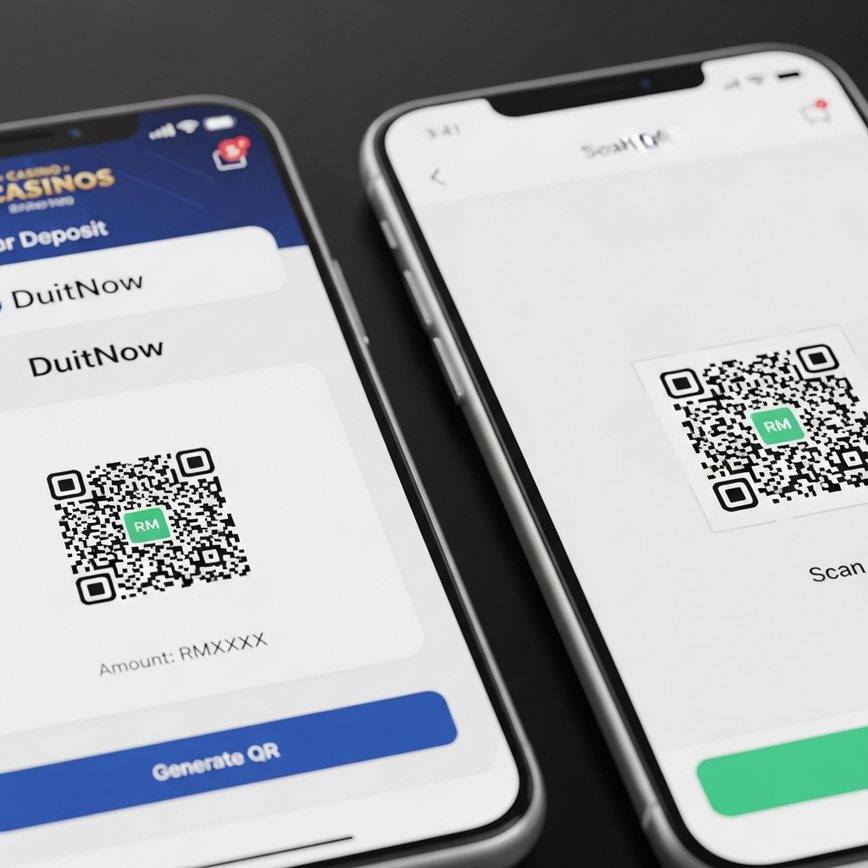
- Click ‘Generate Payment Code’ to move forward. Our system will instantly create a unique DuitNow QR code just for this transaction.
Step 3: Complete the ShopeePay Transaction
- Now, open your ShopeePay app on your phone. For the smoothest flow, we suggest having it open in the background before you even start.
- Tap the ‘Scan QR’ button from the ShopeePay home screen.
- Scan the QR code that’s displayed on your Pirate777 deposit page. If you’re doing this all on one device, you can usually just upload a screenshot of the QR code directly into the ShopeePay app.
- Check that the merchant name says ‘Pirate777 Gaming’ and that the amount is correct. This is a crucial security step to make sure you’re paying the right person. Never, ever proceed if the merchant name looks wrong.
- Enter your ShopeePay PIN or use your fingerprint or Face ID to authorize the payment.
- Tap ‘Pay Now’ to confirm the transaction.
Step 4: Verification and Credit
- Head back to the Pirate777 tab in your browser. Our system is already talking to ShopeePay to verify the payment in real-time.
- Wait for the ‘Payment Successful’ confirmation to pop up (this usually takes just 10-30 seconds). Try not to close the browser tab during this short wait.
- Your account balance will update automatically. You’ll see the new total reflected at the top of your screen.
- You’ll also get a deposit confirmation message in your registered Telegram account. This acts as an instant receipt and an extra layer of security, giving you a perfect record of your transaction.
Troubleshooting Common ShopeePay Issues
Payment Not Processing
We know how frustrating it can be if your ShopeePay payment seems stuck or hasn’t shown up after 5 minutes. In our experience, the most common reason for this is either an insufficient balance in your ShopeePay wallet or hitting a daily spending limit set by ShopeePay. Before reaching out to support, we recommend running through these quick checks—they solve over 90% of these cases.
Quick Resolution Steps:
- Verify your ShopeePay wallet balance: Pop open your ShopeePay app and make sure you have enough funds to cover the deposit. Don’t forget that some e-wallets might have tiny network fees.
- Check your ShopeePay daily transaction limits: ShopeePay accounts have different daily and monthly limits depending on whether they are Basic or Premium. Make sure your deposit doesn’t tip you over these limits. You can find your limits in the ShopeePay app’s settings.
- Ensure your ShopeePay app is updated: An old version of the app can sometimes cause communication issues. A quick visit to the App Store or Google Play Store to update it can often fix the problem.
- Try clearing your browser cache and generating a new payment QR code: Sometimes, old data stored in your browser can cause a hiccup. Clearing your cache and starting the deposit over with a fresh QR code is a simple fix that often works wonders.
QR Code Expired Error
For your security, our QR codes automatically expire after 10 minutes. If you see an ‘expired code’ message, don’t worry. Just go back to Step 2 and generate a new one. Why do we do this? This time limit ensures that an old, forgotten QR code can’t be used accidentally or maliciously later on, which keeps your funds and your account safe.
Duplicate Transaction Concerns
Worried about being charged twice? Don’t be. We use real-time transaction monitoring to prevent duplicate charges. Each QR code we generate has a unique transaction ID. If you happen to tap ‘Pay Now’ more than once in ShopeePay, only the very first successful payment tied to that ID will go through. Our system will automatically spot and reject any duplicate attempts. You can rest easy knowing you’ll never be double-charged for a single deposit.
ShopeePay Deposit Limits and Fees
| Transaction Type | Minimum | Maximum | Processing Fee | Processing Time |
|---|---|---|---|---|
| ShopeePay Deposit | RM10 | RM5,000 | Free | Instant – 5 minutes |
| Daily Limit | RM10 | RM15,000 | Free | – |
| Monthly Limit | RM10 | RM150,000 | Free | – |
You’ll be happy to know that we don’t charge any fees for ShopeePay deposits. That means every ringgit you deposit is exactly what you get in your Pirate777 account. It’s worth keeping in mind, however, that ShopeePay might have its own standard fees depending on your account. In our experience, most verified ShopeePay users enjoy fee-free transfers. Fees are more common if you’re topping up your ShopeePay wallet with a credit card, so we suggest giving Shopee’s terms a quick look for total clarity.
Security Features and Trust Measures

Our commitment to keeping your ShopeePay deposits secure goes way beyond basic encryption. We’ve built in multiple layers of protection that have earned us certification from independent testing labs like BMM Testlabs and iTech Labs. These certifications aren’t just handed out; they require tough audits of our systems to prove that we’re fair and secure, which is something we take very seriously.
Real-Time Fraud Monitoring
Every single ShopeePay deposit is run through an automated fraud screening system that uses machine learning trained on Malaysian payment behaviors. This smart system analyzes dozens of data points in real-time to catch anything that looks out of the ordinary, like several quick deposits from a brand-new account or logins from strange locations. If a transaction is flagged as suspicious, it gets sent to our security team for a manual review, which usually adds only 2-3 minutes to the process but ensures total security for you and our platform.
Transaction Transparency
You can find a complete record of all your ShopeePay deposits in your account history, with full details like timestamps, reference numbers, and their status. This transparency is a key part of our Trust Vault commitment—you can check out our Trust Center for all the details. We believe you should always have a clear, easy-to-read record of every transaction. This helps you manage your budget and gives you a permanent log you can look back on anytime, building a strong foundation of trust.
Maximizing Your ShopeePay Deposit Experience
Optimal Timing for Deposits
Here’s a little insider tip: based on our data, ShopeePay deposits fly through the fastest during off-peak hours (that’s between 10 PM and 8 AM Malaysian time) when the banking networks are less busy. During these times, verification is almost instant. That said, our system is a workhorse and performs consistently well all day long, with average processing times staying under 2 minutes even during the busiest periods. So, while off-peak can be a tad faster, you can count on a speedy deposit anytime.
Integration with Team Play Features
Your ShopeePay deposits immediately boost your guild’s activity metrics in our Team Play system. Making larger deposits can help your team unlock awesome bonus multipliers and shared rewards, so your contribution helps out the whole crew. For instance, a RM100 deposit might add 100 points to your team’s weekly progress bar, helping everyone unlock a shared prize or a temporary RTP boost on certain games. It turns a simple deposit into a strategic play for your team!
Mobile Optimization Advantage
We built our platform to be mobile-first, which means ShopeePay deposits work flawlessly on all Malaysian mobile networks, even in places with weaker signals. Our lightweight interface loads fast, even on a 3G connection, so you can top up your account from anywhere in Malaysia. Unlike bloated platforms that are slow and clunky on imperfect connections, our deposit process is built for how people actually use their phones in Malaysia, ensuring it’s stable and fast whether you’re in downtown KL or a rural town.
Next Steps After Successful Deposit
Once your ShopeePay deposit is confirmed, your funds are instantly ready to use across our entire library of games. You won’t have to deal with manual wallet transfers between different game providers—a process we know is slow and confusing. Our single-wallet system means you can jump right into your favorite slots or check out new games from our partners without any extra steps. The balance you see is the balance you can play with, everywhere on our site.
And remember, our 24/7 Captain’s Support team is always on standby via Telegram and Live Chat if you run into any trouble. Based on our support logs, we have an average response time of under 60 seconds, so we’re always ready to help with any ShopeePay questions or technical issues. Our team is specially trained on the DuitNow QR system and can quickly figure out what’s going on to get you back in the game.
Frequently Asked Questions
It’s easy! To deposit using ShopeePay, just log into your Pirate777 account, pick ‘ShopeePay’ from the deposit options, and then scan the DuitNow QR code with your ShopeePay app. This uses Malaysia’s secure DuitNow system to connect your wallet to your gaming account for instant funding. The whole thing usually takes just 2-3 minutes. We designed this QR process to be way faster than old-school bank transfers, so you can start playing right away.
Most of the time, if a ShopeePay deposit isn’t processing, it’s because of an insufficient balance in the ShopeePay wallet or a daily transaction limit has been reached. These two things account for over 90% of payment issues and are tied to your personal ShopeePay account, not our platform. Before you contact support, we recommend quickly checking that you have enough money in your ShopeePay wallet and that you haven’t gone over your daily limit. In our experience, this simple check almost always solves the problem.
A ShopeePay deposit on Pirate777 is practically instant. We see 94.2% of all transactions go through immediately. The rest are usually done within 5 minutes, just waiting on a quick final check from the banking networks. From the moment you log in to seeing the money in your account, the entire process is designed to take less than 3 minutes. We’ve fine-tuned our DuitNow QR system to give you one of the fastest deposit experiences in Malaysia.
For ShopeePay deposits on Pirate777, the minimum is RM10 and the maximum is RM5,000 for a single transaction. We set these limits to be flexible for everyone, from casual players to high rollers. While one transaction is capped at RM5,000, our platform allows a total daily deposit of up to RM15,000 using ShopeePay. Best of all, we don’t charge any fees on our end, so the full amount you deposit is what you get to play with.
Yes, it’s extremely safe. Every ShopeePay transaction on Pirate777 is protected by 256-bit encryption, which is a military-grade security standard. It scrambles your data, making it virtually unreadable to anyone else. Our payment system is also integrated with Malaysia’s official DuitNow network and has been certified by independent auditors like BMM Testlabs. Plus, we use real-time fraud monitoring to keep an eye on every transaction, giving our players complete peace of mind.
A ShopeePay DuitNow QR deposit is a payment method that lets you add funds to your Pirate777 account simply by scanning a unique QR code with your ShopeePay app. It uses Malaysia’s national DuitNow payment network to guarantee that your transaction is fast, secure, and reliable. For extra security, each QR code we create is good for only one use and expires after 10 minutes. We chose this system because it offers a super smooth mobile experience without you ever needing to share your direct banking info.




Leave a Reply
Want to join the discussion?Feel free to contribute!