



How to Deposit on Pirate777: DuitNow, ShopeePay & eWallet Guide (2026)
Topping up on Pirate777 takes about two minutes from the Wallet screen. Deposits start at RM 10 (RM 30 for the Touch’n Go, GrabPay and ShopeePay wallets and for a manual bank transfer), and you can fund them by DuitNow QR, ShopeePay, Touch’n Go, GrabPay, FPX online banking, a manual bank transfer, or a Telco/TNG reload PIN — deposits are accepted from any Malaysian bank on the DuitNow and FPX networks, and a telco reload PIN earns a 5% bonus with no turnover requirement. eWallet, FPX, and bank transfer all credit at 1:1; Telco PINs credit below face value, so they’re the most expensive route in cash terms. This guide walks through each option with the in-app screens we captured in 2026, and pairs neatly with our Pirate777 account registration guide if you haven’t signed up yet.
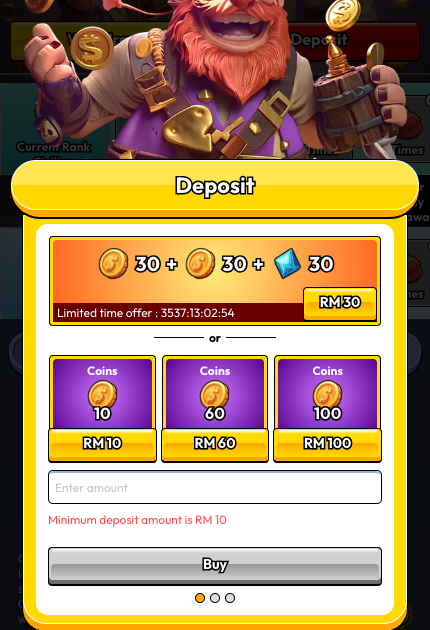
Table of Contents
- What Should You Check Before You Deposit?
- How Do You Reach the Payment Options?
- Option A — E-Wallet (DuitNow, ShopeePay, Touch’n Go, GrabPay)
- Option B — FPX Pay (Online Banking)
- Option C — Bank Transfer
- Option D — Telco + TNG Reload
- Which Deposit Method Should You Pick?
- What If Your Deposit Doesn’t Arrive?
- Safety, Privacy, and Responsible Play
What Should You Check Before You Deposit?
- Make sure your funding source matches your registered name. Pirate777 follows a strict anti-money-laundering rule — the bank account, eWallet, or PIN you use to deposit must be in the same full legal name you registered on Pirate777. Deposits from a third-party account are rejected automatically and the amount is returned to the source. No IC upload is required at the deposit step — only that the names match; identity is checked at your first withdrawal, by Captain’s Support.
- Minimum deposit: RM 10 by DuitNow QR, FPX Pay or a reload PIN; RM 30 by Touch’n Go, GrabPay, ShopeePay or a manual bank transfer — the cashier simply hides a method when the amount sits outside its band (read 8 September 2026).
- Mega888 and 918KISS bets don’t count toward promotional wagering requirements or rebates — platform-wide rule, applies to any deposit bonus you claim.
- Currency: All amounts are in MYR (RM). No foreign card support.
How Do You Reach the Payment Options?
The app layers the deposit flow in two steps — you pick an amount first, then you pick a payment method.
Step 1 — Open the Deposit Modal
Tap Wallet in the bottom nav, then tap the red Deposit button at the top. You can also tap the “+” icon in the header from any screen.
Step 2 — Pick an Amount (Mode 1)
The first screen shows coin packages. There’s usually a limited-time offer at the top (e.g. RM 30 → 30 coins + 30 bonus coins + 30 XP — that is the first-deposit bonus: 1 coin = RM 1 and withdrawable, XP only drives rank progression, the bonus carries a RM 180 minimum and RM 300 maximum withdrawal, and Mega888 play is excluded from it) and three standard tiers below (RM 10 / RM 60 / RM 100). You can also type a custom amount in the “Enter amount” field. The amount screen accepts RM 10 upward, but a method whose floor is higher — the three wallets and manual bank transfer start at RM 30 — simply does not appear on the next screen. Tap a tier (or type an amount), then tap Buy.
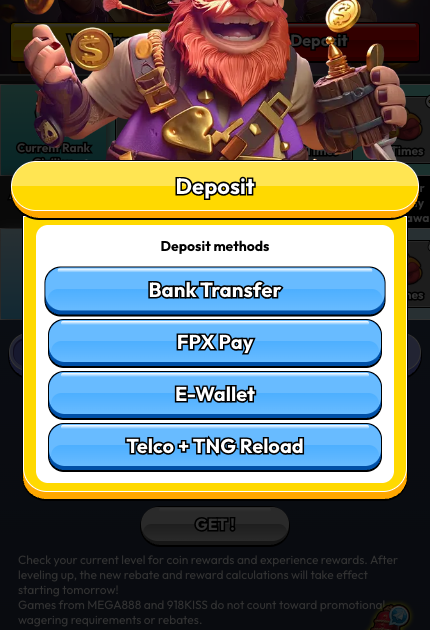
Step 3 — Pick a Payment Method (Mode 2)
Four buttons appear:
- Bank Transfer
- FPX Pay
- E-Wallet
- Telco + TNG Reload
Option A — E-Wallet (DuitNow, ShopeePay, Touch’n Go, GrabPay)
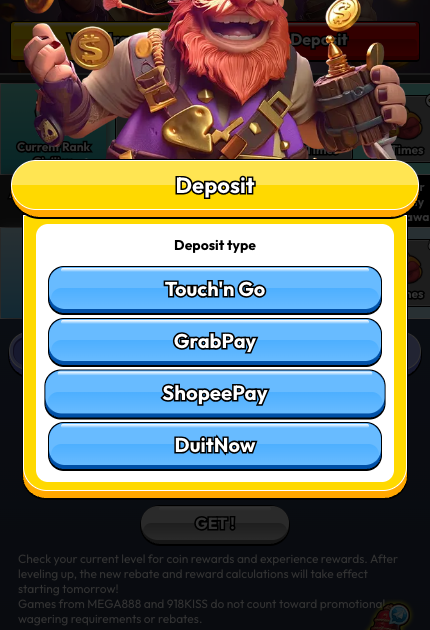
Tapping E-Wallet opens a sub-picker — four options on the April 2026 screens captured for this guide:
- Touch’n Go
- GrabPay
- ShopeePay
- DuitNow
Boost and Maybank QR Pay are accepted too — they sit inside the DuitNow QR payment window rather than on this picker: tap DuitNow, then choose Boost or Maybank QR Pay on the QR window that opens (read 9 September 2026; Boost is deposit-only — it cannot receive withdrawals). Which wallets the picker surfaces can vary by moment and payment processor, so treat the four above as the set we saw, not the ceiling.
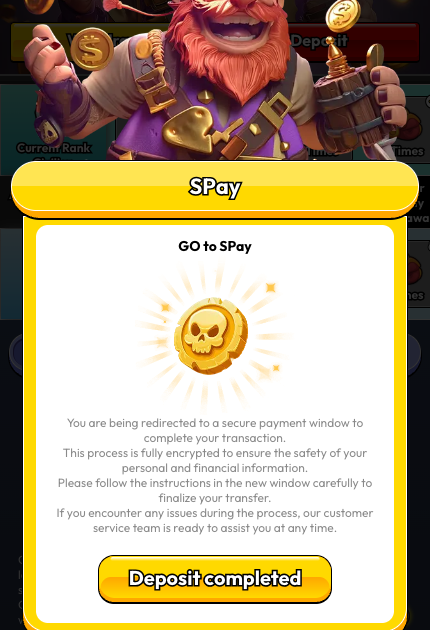
Tap your preferred wallet. The app shows a “GO to [Wallet]” confirmation screen explaining that you’re being redirected to a secure payment window. Tap Deposit completed once the gateway transaction finishes.
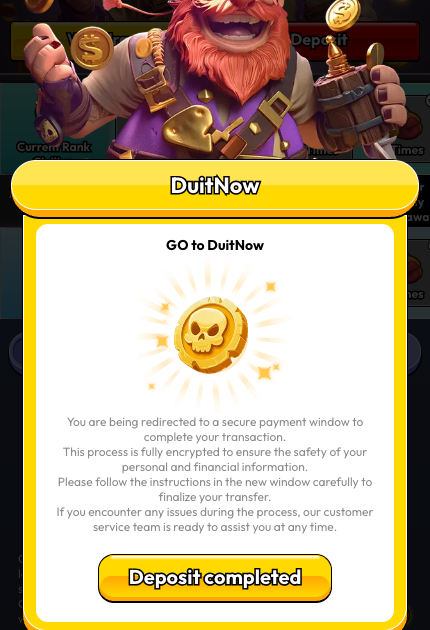
Note on DuitNow. The DuitNow option inside the eWallet picker is the DuitNow QR rail — you’ll be redirected to scan a QR code with your banking or eWallet app. This is separate from DuitNow Transfer (instant account-to-account). If you want to send a DuitNow Transfer from your bank to a Pirate777 account, use Bank Transfer or FPX Pay instead.
When to pick this: you already use the wallet app on your phone and want the fastest flow. In our own operational records over the twelve months to January 2026, DuitNow QR credits in 30–60 seconds, Touch’n Go in 1–3 minutes, GrabPay in 2–4 minutes and ShopeePay in 2–6 minutes, with first-attempt success rates of 99.2%, 98.8%, 97.5% and 96.8% respectively. DuitNow QR is the broadest — most Malaysian banks and eWallets support it. If you’re still deciding which wallet to install, our eWallet comparison guide for Malaysian slot players compares them side by side.
Option B — FPX Pay (Online Banking)
Tapping FPX Pay redirects through the cashier’s payment gateway, which supports every FPX-enrolled Malaysian bank (Maybank, CIMB, RHB, Public Bank, Hong Leong, Bank Islam, BSN, Affin, Alliance, AmBank, UOB, OCBC, and more).
When to pick this: you want to pay directly from your bank account and you have internet banking set up. No wallet balance needed.
Option C — Bank Transfer
Tapping Bank Transfer opens an in-app Online Banking form. The receiving bank, account number, and account name are shown to you in-app at the time of deposit (we’ve redacted them in our screenshot below).
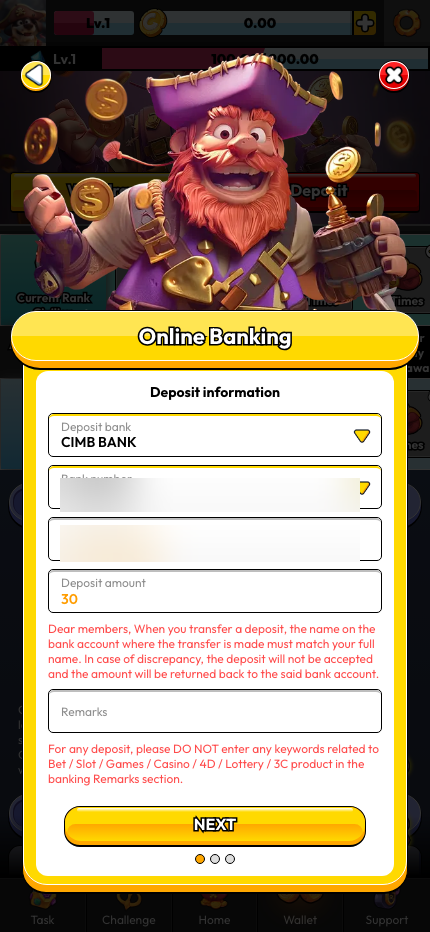
Fields to fill:
- Deposit bank — dropdown of the receiving banks on offer that day; they change from time to time, so always take the bank from the form itself
- Bank number — Pirate777’s receiving account number (shown in-app)
- Account name — account holder on the receiving side (shown in-app)
- Deposit amount — match exactly what you transferred
- Remarks — optional reference
Then tap NEXT. Two on-screen warnings to note:
- “When you transfer a deposit, the name on the bank account where the transfer is made must match your full name. In case of discrepancy, the deposit will not be accepted and the amount will be returned back to the said bank account.”
- “For any deposit, please DO NOT enter any keywords related to Bet / Slot / Games / Casino / 4D / Lottery / 3C product in the banking Remarks section.”
When to pick this: you prefer doing the transfer manually in your bank’s app and reconciling after. A DuitNow instant transfer reaches us in real time; an IBG transfer follows PayNet’s national clearing windows — sent before 5:00 pm on a business day it is credited the same day, later or on a weekend it lands the next business day by 11:00 am — and your deposit is credited once the transfer is matched to your form.
Option D — Telco + TNG Reload
Tapping Telco + TNG Reload opens an in-app PIN form (no gateway redirect).
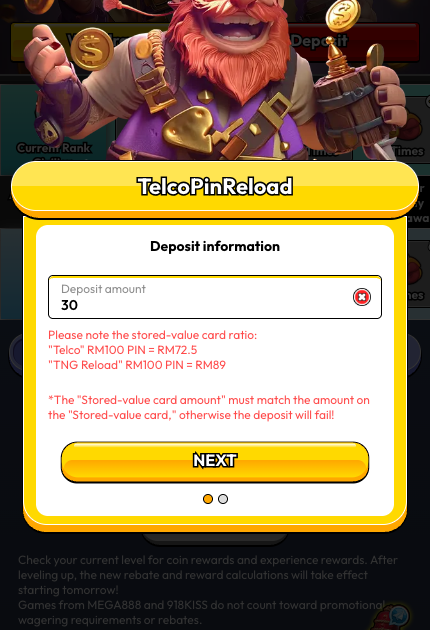
Key conversion ratios shown on-screen:
- “Telco” RM 100 PIN = RM 72.5 deposit
- “TNG Reload” RM 100 PIN = RM 89 deposit
Supported telcos: U Mobile, Celcom, Digi, Hotlink.
Warning on the form: “The ‘Stored-value card amount’ must match the amount on the ‘Stored-value card,’ otherwise the deposit will fail!”
When to pick this: you have a physical or SMS-delivered prepaid PIN and prefer not to connect a bank or wallet. Note the heavy conversion loss — you lose about 27.5% with a Telco PIN and about 11% with a TNG Reload PIN, so it’s the most expensive route in cash terms. The offset is the telco-PIN bonus: every deposit made with a telco reload PIN earns a 5% bonus with no turnover requirement under the “Top up with Telco Pin, get 5% bonus” promotion (running 12 November 2025 to 31 December 2026). Claim it through Captain’s Support within 24 hours of the deposit; it cannot be combined with any other deposit bonus.
Which Deposit Method Should You Pick?
| Method | Redirect? | Typical speed | Cost vs deposit | Min – max per deposit | Best for |
|---|---|---|---|---|---|
| DuitNow QR (E-Wallet) | Yes (3rd-party gateway) | 30–60 sec (our records) | 1:1 | RM 10 – RM 30,000 | Most Malaysians — scan via bank or wallet app |
| ShopeePay / TnG / GrabPay | Yes (3rd-party gateway) | 1–6 min (TnG 1–3 · GrabPay 2–4 · ShopeePay 2–6) | 1:1 | RM 30 – RM 5,000 | Existing wallet users |
| FPX Pay | Yes (payment gateway) | On your bank’s confirmation | 1:1 | RM 10 – RM 10,000 | Pay direct from bank, no wallet balance |
| Bank Transfer | No (in-app form) | Instant transfer: real time · IBG: same day before 5 pm | 1:1 | RM 30 – RM 100,000 (your bank’s own transfer limit applies first) | Manual transfer, full control |
| Telco PIN | No (in-app form) | Instant on PIN entry | ~72.5% retention, +5% bonus | RM 10 – RM 5,000 | Users with prepaid PINs only |
| TNG Reload PIN | No (in-app form) | Instant on PIN entry | ~89% retention | RM 10 – RM 5,000 | Users with TNG PINs only |
Payment methods and limits last verified 8 September 2026, read directly from the cashier. We update this page when they change.
What If Your Deposit Doesn’t Arrive?
- “Minimum deposit amount is RM 10” warning. You typed or selected less than RM 10. Increase to at least RM 10.
- Name mismatch on Bank Transfer. The transfer’s sender name must match your full registered name — that’s the #1 reason deposits get bounced back.
- Telco/TNG PIN failure. The PIN value must exactly match the face value on the card. Entering a RM 50 PIN as “100” fails.
- Gateway redirect didn’t complete. If you close the external window before the gateway confirms, Pirate777 doesn’t credit your account. Re-open the gateway from the Deposit completed screen or contact Support (bottom nav → Support chat).
Safety, Privacy, and Responsible Play

Every deposit on our platform runs over 256-bit SSL encryption. FPX and DuitNow both run on PayNet’s national payment rails — the Real-time Retail Payments Platform, with Bank Negara Malaysia as PayNet’s largest shareholder — and the payment gateways behind the FPX and eWallet redirects handle your credentials, not us: Pirate777 never sees your banking login or eWallet PIN, only the gateway’s confirmation that the transaction was approved.
We also point players to responsible gaming organisations including GamCare and BeGambleAware. If you want to set deposit limits, take a cool-off period, or self-exclude, contact our 24/7 Captain’s Support team — we set those up on your account directly rather than hiding them behind a self-service menu. Public guidance is available from support and advice from GamCare and responsible gambling guidance from BeGambleAware. Pirate777 is designed for players aged 18 and above. Only deposit what you can afford to lose.
Once your first deposit lands, the next stop is usually our 2.3-minute withdrawal guide for setting up your payout bank, and our Game Academy for finding your first game.
— Pirate777 Team. We verify our observations against each studio’s own published game data and, where a studio holds one, its licence record on the regulator’s public register.
Frequently Asked Questions
Yes. DuitNow is one of the eWallet options (alongside Touch’n Go, GrabPay, and ShopeePay). The eWallet picker uses the DuitNow QR rail — you’ll scan a code through your banking or eWallet app. By DuitNow QR the minimum deposit is RM 10 (up to RM 30,000 per deposit) and the transaction is 1:1 with no conversion fee from Pirate777’s side.
RM 10 by DuitNow QR, FPX Pay or a Telco/TNG reload PIN. Touch’n Go, GrabPay, ShopeePay and manual bank transfer start at RM 30. The cashier hides a method rather than showing an error when your amount is outside its band (cashier read, 8 September 2026).
DuitNow QR, if you already have a banking or wallet app set up — in our own operational records it credits in 30–60 seconds, with Touch’n Go at 1–3 minutes, GrabPay 2–4 and ShopeePay 2–6. FPX Pay credits on your bank’s confirmation. A manual bank transfer is real-time by DuitNow instant transfer, or follows the IBG clearing windows (same day if sent before 5:00 pm on a business day). Telco and TNG PINs are instant once you enter the PIN, but they credit below face value, so they’re the most expensive route.
The platform applies a conversion rate to Telco PINs (U Mobile, Celcom, Digi, Hotlink) — RM 100 face value = RM 72.5 deposit credit. TNG Reload PINs are better: RM 100 = RM 89. eWallet, FPX, and Bank Transfer are all 1:1.
No. Pirate777 follows a strict anti-money-laundering rule: the bank account, eWallet, or PIN you use to deposit must be in the same full legal name you registered on Pirate777. Deposits from a third-party account are rejected automatically and the amount is returned to the source. There’s no IC upload required at the deposit step — only that the names match; identity is checked at your first withdrawal, by Captain’s Support.
Pirate777’s eWallet picker uses DuitNow QR — you scan a code with your banking app or supported eWallet. That’s the fastest flow (30–60 seconds in our own records). DuitNow Transfer (a direct account-to-account push from your bank’s app) isn’t exposed as a separate button — if that’s your preferred rail, use Bank Transfer or FPX Pay — both rails are operated by PayNet, the same national payments operator behind DuitNow QR.
No platform fee from Pirate777’s side. Any fees you see are from your bank or wallet provider.